
Zabbix settings
For ZABBIX monitoring to work, settings must be made in both PassMan and Zabbix, which must be in sync!
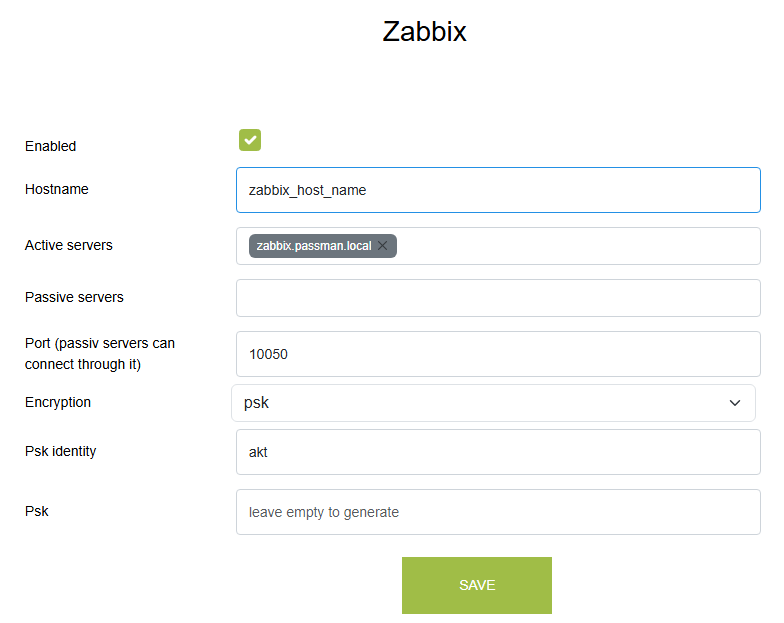
Enabled: This checkbox can be used to enable/disable Zabbix data collection and sending
Hostname: This is the unique identifier set in Zabbix hostname, which must be entered here (it must be the same in Passman and Zabbix!)
Active servers: When the data provider is ACTIVE, i.e. PassMan is sending data to Zabbix. Multiple Zabbix servers can be specified.
Passive servers: When the data provider is PASSIVE, i.e. the Zabbix server is retrieving data from the PassMan machine. Multiple Zabbix servers can be specified.
PSK identity: Unique identifier. The PSK identity is the name of the pre-shared key (PSK) identifier in Zabbix. It is a non-secret text string of UTF-8 characters that is used by Zabbix components (agent, proxy, server) to tell them which PSK value to use when encrypting communication.
PSK value (secret): the encryption key value, which is automatically generated after saving if the field is left blank and can be copied from here
The PSK ID and PSK value must be saved on the Zabbix server in the Encryption setting of the item corresponding to the Zabbix hostname specified above.